A4
210 × 297 mm; 8.27 × 11.69 in in the current chart. Use it when the document, destination, or printer explicitly calls for A4.
Printable reference + builder
Use this paper size chart to compare physical sheet dimensions before choosing a printer setting, document template, envelope, poster format, or drawing sheet. The current dataset lists A4 as 210 × 297 mm (8.27 × 11.69 in), US Letter as 216 × 279 mm (8.5 × 10.98 in), and US Legal as 216 × 356 mm (8.5 × 14.02 in). Inch values are calculated from the dataset’s rounded millimeter values using 25.4 mm per inch, then rounded to two decimals.
Start with the family required by the task. ISO A, B, and C; North American common sizes; ANSI engineering sheets; and Arch drawing sheets are separate systems, not one worldwide sequence. A nearby dimension is not permission to substitute. The printer manual, application page setup, drawing contract, mailing specification, or project standard controls when it names a format. Pixel dimensions are a second decision because they depend on DPI, image orientation, bleed, and the required final output.
Quick answer
A4
210 × 297 mm; 8.27 × 11.69 in in the current chart. Use it when the document, destination, or printer explicitly calls for A4.
US Letter
216 × 279 mm; 8.5 × 10.98 in after conversion from the chart’s rounded millimeter row. It is the common office choice in many North American workflows.
US Legal
216 × 356 mm; 8.5 × 14.02 in by the same method. Select it only when the document and printer support the longer sheet.
These are physical dimensions, not printable-area promises. A printer can reserve margins, rotate output, scale to fit, or reject a loaded size. Check the device tray, driver, application page setup, orientation, and scaling before a final run. If a supplied template or client specification gives dimensions that differ from this reference, use the supplied specification and report the mismatch rather than silently resizing the work.
Use the paper size chart builder to choose the size families and columns needed for the job. The current controls can include ISO A, ISO B, ISO C, US Common, ANSI Engineering, Arch Architecture, and Photo Sizes. Millimeters and inches can be shown together. The optional pixel column is calculated at 300 DPI by the chart; it does not make 300 DPI correct for every press, screen, scanner, or image workflow.
The Office & Home preset combines ISO A and US Common. Creative & Print adds ISO B, photo sizes, and the 300-DPI pixel column. Architecture uses ANSI and Arch rows with an inch-first blueprint layout. These presets organize the current dataset; they do not choose the governing format for a project.
Browser Print remains free and does not use the daily download quota. The Free plan allows one PDF or PNG download per day. The current Pricing page describes Pro downloads as Unlimited. That is the current plan wording, not a promise of unlimited API access, automated bulk exports, unrestricted redistribution, or a permanent plan or price. Content use and redistribution remain governed by the Terms, and export does not certify dimensional compliance.
Office & Home • A4 (portrait) • 1 page • portrait
ChartsPrintables.com
Standard Dimensions Reference Guide
| System | Name | Size (mm) | Size (inches) | Notes |
|---|---|---|---|---|
| ISO A Series | A0 | 841 × 1189 | 33.11" × 46.81" | - |
| ISO A Series | A1 | 594 × 841 | 23.39" × 33.11" | - |
| ISO A Series | A2 | 420 × 594 | 16.54" × 23.39" | - |
| ISO A Series | A3 | 297 × 420 | 11.69" × 16.54" | - |
| ISO A Series | A4 | 210 × 297 | 8.27" × 11.69" | Standard International Paper |
| ISO A Series | A5 | 148 × 210 | 5.83" × 8.27" | - |
| ISO A Series | A6 | 105 × 148 | 4.13" × 5.83" | - |
| ISO A Series | A7 | 74 × 105 | 2.91" × 4.13" | - |
| ISO A Series | A8 | 52 × 74 | 2.05" × 2.91" | Business Card Size |
| ISO A Series | A9 | 37 × 52 | 1.46" × 2.05" | - |
| ISO A Series | A10 | 26 × 37 | 1.02" × 1.46" | - |
| US Common | Letter | 216 × 279 | 8.5" × 10.98" | Standard US Paper |
| US Common | Legal | 216 × 356 | 8.5" × 14.02" | - |
| US Common | Tabloid | 279 × 432 | 10.98" × 17.01" | - |
| US Common | Ledger | 432 × 279 | 17.01" × 10.98" | - |
| US Common | Junior Legal | 127 × 203 | 5" × 7.99" | - |
| US Common | Half Letter | 140 × 216 | 5.51" × 8.5" | - |
| US Common | Gov. Letter | 203 × 267 | 7.99" × 10.51" | - |
| US Common | Gov. Legal | 216 × 330 | 8.5" × 12.99" | - |
1 inch = 25.4 mm
Sizes
19
Format
A4 (portrait)
PDF SIZE
≈0KB
Quality
300 DPI
Export Set
One setup, every version you need.
Visual quick reference
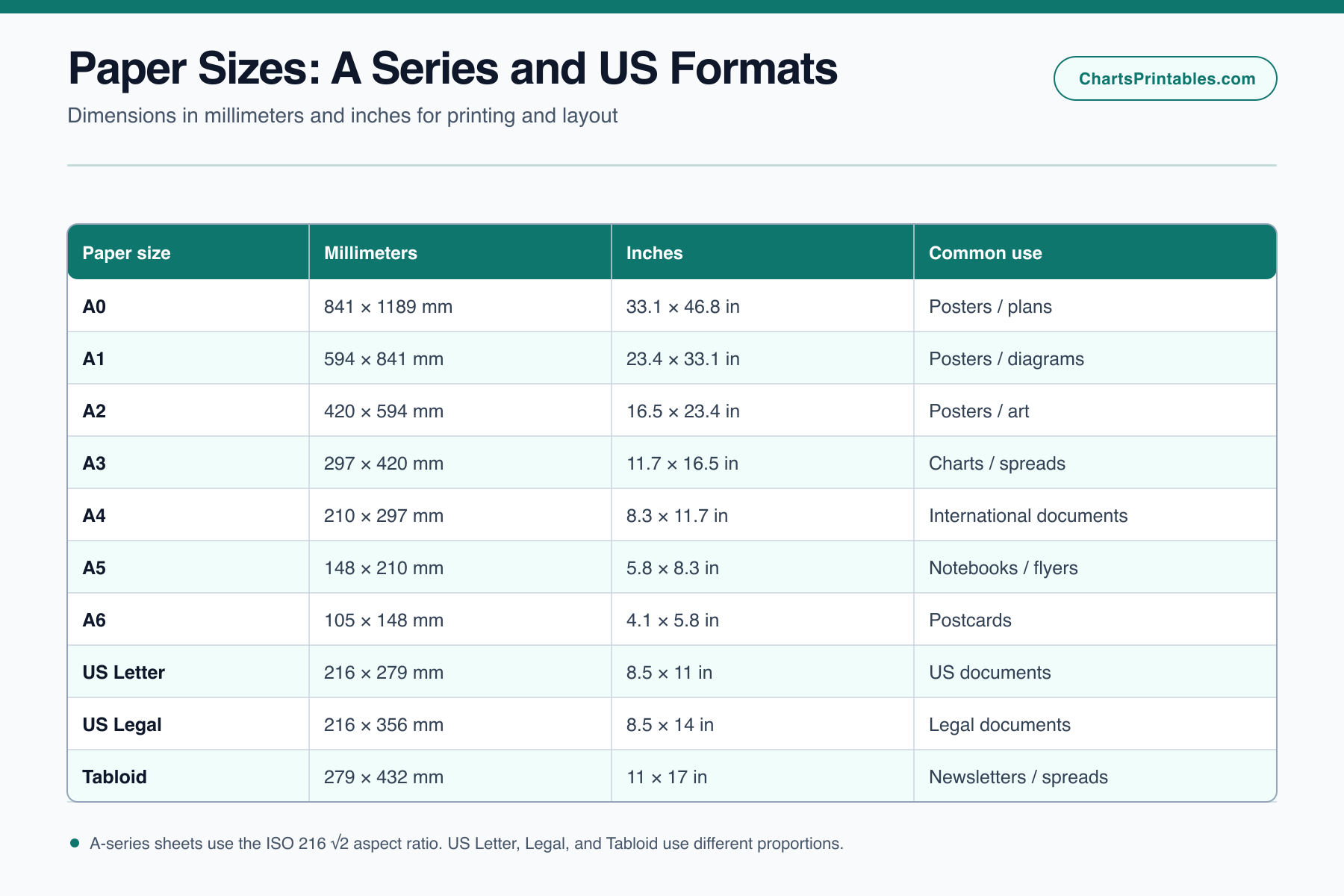
A4 measures 210 × 297 mm (about 8.3 × 11.7 inches), while US Letter measures 8.5 × 11 inches, so the formats are similar but not interchangeable.
The visual table compares A0 through A6 with US Letter, Legal, and Tabloid dimensions. Use the exact target sheet size when laying out a printable so margins and scaling remain predictable.
One lookup, related units
A4 is 210 × 297 mm; Letter is 215.9 × 279.4 mm. Letter is wider and shorter, so changing paper sizes without reflowing a layout can clip content. The pixel dimensions below are rounded to the nearest pixel.
Swipe across the table to see every unit column.
| Paper | Millimeters | 150 DPI pixels | 300 DPI pixels |
|---|---|---|---|
| A4 | 210 × 297 | 1240 × 1754 | 2480 × 3508 |
| US Letter | 215.9 × 279.4 | 1275 × 1650 | 2550 × 3300 |
| A3 | 297 × 420 | 1754 × 2480 | 3508 × 4961 |
| US Legal | 215.9 × 355.6 | 1275 × 2100 | 2550 × 4200 |
Formula: pixels = millimeters ÷ 25.4 × DPI. Portrait dimensions shown; swap width and height for landscape. Pixel size does not guarantee print quality, and printers still need suitable margins.
Match the document template and receiving workflow first. If collaborators expect A4, keep A4 through editing and output. If the workflow names Letter or Legal, use that named format. Converting late can move page breaks, tables, signatures, and form fields.
Ask the printer for finished size, bleed, safe area, color setup, orientation, and accepted file format. The sheet name alone does not define trim or printable area.
ISO B rows can help compare larger publication formats, but the publisher or print provider controls the actual finished size. Do not infer a press sheet from a finished page.
Start with the unfolded or folded insert dimensions, then confirm the envelope’s internal clearance, seam, flap, and postal requirements. A dimensional match is only the first check.
Use the drawing contract or office standard to choose ANSI, Arch, or another specified family. Confirm title-block template, plotter roll or tray, scale, and revision requirements before printing.
ISO A-series sheets retain an aspect ratio of 1:√2 in the underlying system, so halving a larger sheet parallel to its short side produces the next smaller nominal format with the same proportion, subject to standardized rounding. This explains the A0, A1, A2 progression. It does not make every document automatically resize without layout changes.
ISO B and C serve different roles. The current chart presents B rows as a separate size family and C rows as envelope references. Do not treat a B or C label as an alternate name for an A sheet.
North American Letter, Legal, Tabloid, and Ledger rows do not follow the ISO A-series progression. ANSI engineering rows and Arch drawing rows are also separate technical families. Similar-looking sizes may have different dimensions, title-block expectations, and equipment support.
This paper size chart keeps each family labeled so the user can compare rather than merge them. Complete edition-level source records are not available for every row. Treat the dimensions as reference values and use the named standard, printer documentation, drawing contract, publisher template, or supplier specification when it controls the job.
Paper size chart pixels are calculated only after a physical size and resolution are chosen. Convert millimeters to inches with inches = millimeters ÷ 25.4. Then calculate pixels = inches × DPI for width and height. Round according to the image or print workflow, not by copying an unrelated preset.
For example, the chart’s A4 row uses 210 × 297 mm. At 300 DPI, it calculates 2,480 × 3,508 pixels after rounding. This is a reproducible 300-DPI reference, not a universal file requirement. A 150-DPI draft, 300-DPI print image, and 600-DPI monochrome scan produce different pixel dimensions for the same physical sheet.
Bleed, crop marks, printer margins, raster resampling, and orientation can change the required canvas. A design delivered at 300 DPI may still fail if its trim size, bleed, color space, compression, or effective placed-image resolution is wrong. Use the print provider’s specification as the controlling source. Keep the physical dimensions, target DPI, rounding rule, and bleed assumption beside any pixel number so another person can reproduce it.
For an ISO workflow, the current dataset includes C4 at 229 × 324 mm and C5 at 162 × 229 mm. Those rows can support a first dimensional comparison with A-series inserts. They do not prove that a specific folded packet will feed, seal, or meet mailing rules. Paper weight, number of sheets, fold accuracy, window position, seam construction, and internal clearance all matter.
For North American mail, use the exact envelope product specification rather than assuming a familiar number or marketing label is identical across suppliers. Confirm whether the dimensions are internal or external and whether the insert will be folded.
Before printing, set the application page size and orientation, load the matching tray, and inspect scaling. Fit, shrink, and borderless options can change output dimensions. Print a measured test when physical scale matters. For drawings, labels, forms, or templates with a scale bar, compare the printed scale against a ruler and investigate any mismatch.
A paper size chart helps identify the candidate format. It cannot inspect the printer path, driver, consumables, media stiffness, or finishing process.
2. Compare dimensions. Use the paper size chart to check millimeters and inches without collapsing ISO, North American, ANSI, or Arch labels into one system.
4. Check equipment. Confirm tray or roll support, printable area, duplex behavior, scaling defaults, and media limits in the printer or plotter documentation.
6. Record the choice. Note the selected format and source in the project notes so another editor does not switch from A4 to Letter or from ANSI to Arch during a later revision.
This process favors the project specification over a generic lookup whenever the two disagree.
Method & limits
This paper size chart stores dimensions in millimeters, calculates inches as millimeters ÷ 25.4 rounded to two decimals, and calculates optional pixel values as round(millimeters ÷ 25.4 × DPI). The optional pixel column currently uses 300 DPI. Keep the physical size, DPI, orientation, bleed, and rounding rule with any exported pixel value so another person can reproduce it.
ISO 216:2007 is an external reference for the A/B family concept and 1:√2 relationship. Complete edition-level source records are not available for every ISO, US Common, ANSI, Arch, photo, or envelope row. Treat all dimensions as reference values until checked against the applicable standard, printer documentation, drawing contract, publisher template, or supplier specification.
Use the related conversion charts below to move between millimeters, centimeters, and inches. They convert measurements; they do not select a paper standard.
| Millimeters | Decimal (in) | Fraction (in) |
|---|---|---|
| 0.5 | 0.020 | 0 |
| 1 | 0.039 | 1/16 |
| 6.35 | 0.250 | 1/4 |
| 12.7 | 0.500 | 1/2 |
| 19 | 0.748 | 3/4 |
| 25.4 | 1.000 | 1 |
| 38.1 | 1.500 | 1 1/2 |
| 50.8 | 2.000 | 2 |
| 76.2 | 3.000 | 3 |
| 101.6 | 4.000 | 4 |
| Inches (fraction) | Inches (decimal) | Millimeters | Centimeters |
|---|---|---|---|
| 1/4" | 0.250 | 6.35 | 0.64 |
| 1/2" | 0.500 | 12.70 | 1.27 |
| 1" | 1.000 | 25.40 | 2.54 |
| 1 1/2" | 1.500 | 38.10 | 3.81 |
| 2" | 2.000 | 50.80 | 5.08 |
| 2 1/2" | 2.500 | 63.50 | 6.35 |
| 3" | 3.000 | 76.20 | 7.62 |
| 4" | 4.000 | 101.60 | 10.16 |
| 5" | 5.000 | 127.00 | 12.70 |
| 6" | 6.000 | 152.40 | 15.24 |
| Centimeters | Meters | Decimal (in) | Fraction (in) | ft'-in |
|---|---|---|---|---|
| 5 | 0.05 | 1.97 | 1 15/16" | 0'2" |
| 10 | 0.10 | 3.94 | 3 15/16" | 0'4" |
| 20 | 0.20 | 7.87 | 7 7/8" | 0'8" |
| 30 | 0.30 | 11.81 | 11 13/16" | 1'0" |
| 50 | 0.50 | 19.69 | 19 11/16" | 1'8" |
| 70 | 0.70 | 27.56 | 27 9/16" | 2'4" |
| 90 | 0.90 | 35.43 | 35 7/16" | 2'11" |
| 100 | 1.00 | 39.37 | 39 3/8" | 3'3" |
| 130 | 1.30 | 51.18 | 51 3/16" | 4'3" |
| 180 | 1.80 | 70.87 | 70 7/8" | 5'11" |
| Inches | ft'-in | Centimeters | Meters |
|---|---|---|---|
| 1 | 1" | 2.5 | 0.03 |
| 6 | 6" | 15.2 | 0.15 |
| 12 | 1' 0" | 30.5 | 0.30 |
| 24 | 2' 0" | 61.0 | 0.61 |
| 30 | 2' 6" | 76.2 | 0.76 |
| 36 | 3' 0" | 91.4 | 0.91 |
| 48 | 4' 0" | 121.9 | 1.22 |
| 60 | 5' 0" | 152.4 | 1.52 |
| 63 | 5' 3" | 160.0 | 1.60 |
| 72 | 6' 0" | 182.9 | 1.83 |
The current chart dataset lists A4 as 210 × 297 mm and derives 8.27 × 11.69 inches by dividing millimeters by 25.4 and rounding to two decimals. Confirm the printer, template, or project specification before output.
In the current dataset, A4 is 210 × 297 mm, while Letter is 216 × 279 mm. A4 is narrower and taller. They are separate formats, so scaling or reflow may occur when a document and printer use different settings.
The current chart dataset lists Legal as 216 × 356 mm and derives 8.5 × 14.02 inches from those rounded millimeter values. Check the application page setup and printer tray because a device may label or store the format differently.
No. They are separate size families used for different regional and technical workflows. Similar dimensions do not make two formats interchangeable. Use the family named by the document, printer, drawing contract, or project specification.
Choose the physical width and height in inches, then multiply each by the required DPI and apply the project’s rounding rule. Pixel dimensions depend on DPI; a physical paper name alone does not define one universal pixel size.
No. It is a dimensional reference. Feed path, margins, duplex support, printable area, fold pattern, insert thickness, envelope construction, and software settings can change compatibility. Confirm the printer manual, envelope specification, and project requirements.